Key takeaways
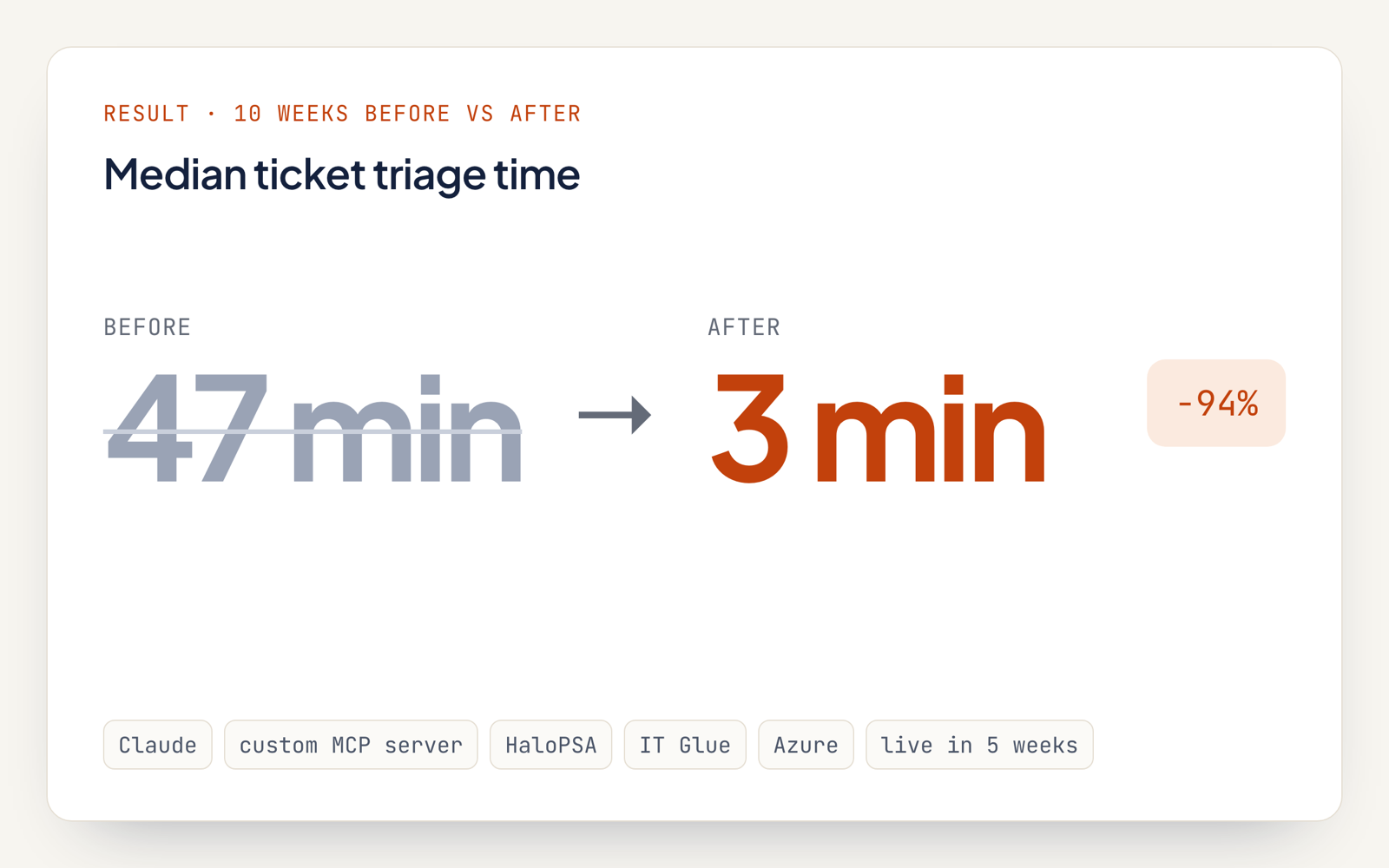
- Median ticket triage time dropped from 47 minutes to 3 minutes, measured across the 10 weeks before and after go-live.
- Over that same window, median first response to clients in business hours went from 1 h 52 min down to 18 min.
- Seven tools on a custom MCP server are the agent's only path into HaloPSA and IT Glue, and no tool can send a message.
- Every client reply gets approved and sent by a technician.
What problem did the MSP's service desk have?
New tickets waited on a human dispatcher to read them, set priority and pick a technician, a median of 47 minutes in business hours.
- Ticket load: roughly 2,300 tickets a month came from 140 client companies by email and portal.
- Manual triage: two dispatchers sorted, ranked and assigned every ticket in HaloPSA.
- Context hunting: technicians dug through IT Glue and past tickets before writing any reply.
- Priority misses: 12% of tickets in a 200-ticket sample carried the wrong priority for the client's SLA.
How does the AI agent classify and route tickets?
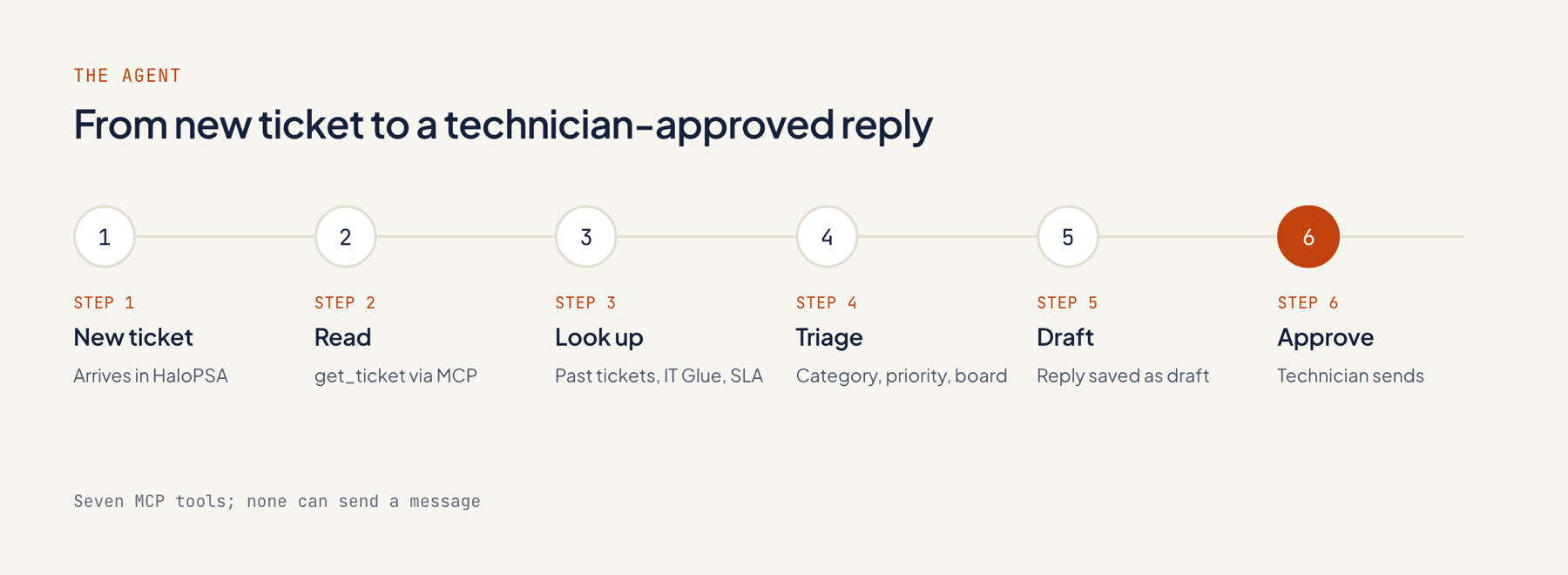
The agent runs on Claude. Applied Agents built this triage agent to read each new ticket, pull client history and documentation through a custom MCP server, set the ticket fields and draft a technician's reply.
- Trigger: each new ticket in HaloPSA fires a webhook that wakes the agent.
- Read: it pulls up the ticket text, the SLA priority matrix and the client's contract.
- Look up: it digs through the client's previous tickets and IT Glue pages for issues that match.
- Classify: category, priority and board get assigned, with a technician proposed based on skill and workload.
- Note: an internal note lands on the ticket: a summary, the likely cause and links to the IT Glue pages it used.
- Draft: the client reply is written and stored as a draft on the ticket.
- Escalate: outage and security tickets, plus anything from a client's named VIPs, bypass the draft and page the on-call technician.
- Approve: after any edits, the technician sends the reply from HaloPSA.
That pattern holds for all the AI agents we build: one job each, a person approving outbound messages.
What does the custom MCP server expose to the agent?
The custom MCP server hands Claude seven named tools, each with fixed permissions. Sending messages and changing client systems are both off limits.
| Tool | What it does | Access |
|---|---|---|
| get_ticket | Reads the new ticket | Read |
| search_tickets | Finds past tickets | Read, same client only |
| search_docs | Searches IT Glue | Read, same client only |
| get_contract | Reads SLA and contract terms | Read |
| set_ticket_fields | Sets category, priority, board, suggested technician | Write, allowed values only |
| add_internal_note | Adds a note technicians see | Write, internal only |
| save_draft_reply | Saves a reply draft | Write, draft only |
It runs in the MSP's Azure tenant, and every tool call is logged. Details: custom MCP servers.
What stayed with people?
Technicians kept every client reply and every fix; the agent's role stops at triage, research and drafting.
- Each draft leaves HaloPSA only after a technician edits and sends it.
- Outage and security tickets go straight to whoever is on call.
- Client system changes belong to technicians; the agent has neither remote-access nor admin rights.
- Tickets the agent flags as low confidence land with dispatchers for review.
- Once a week, the service manager checks the log of overridden fields.
What changed, and how was it measured?
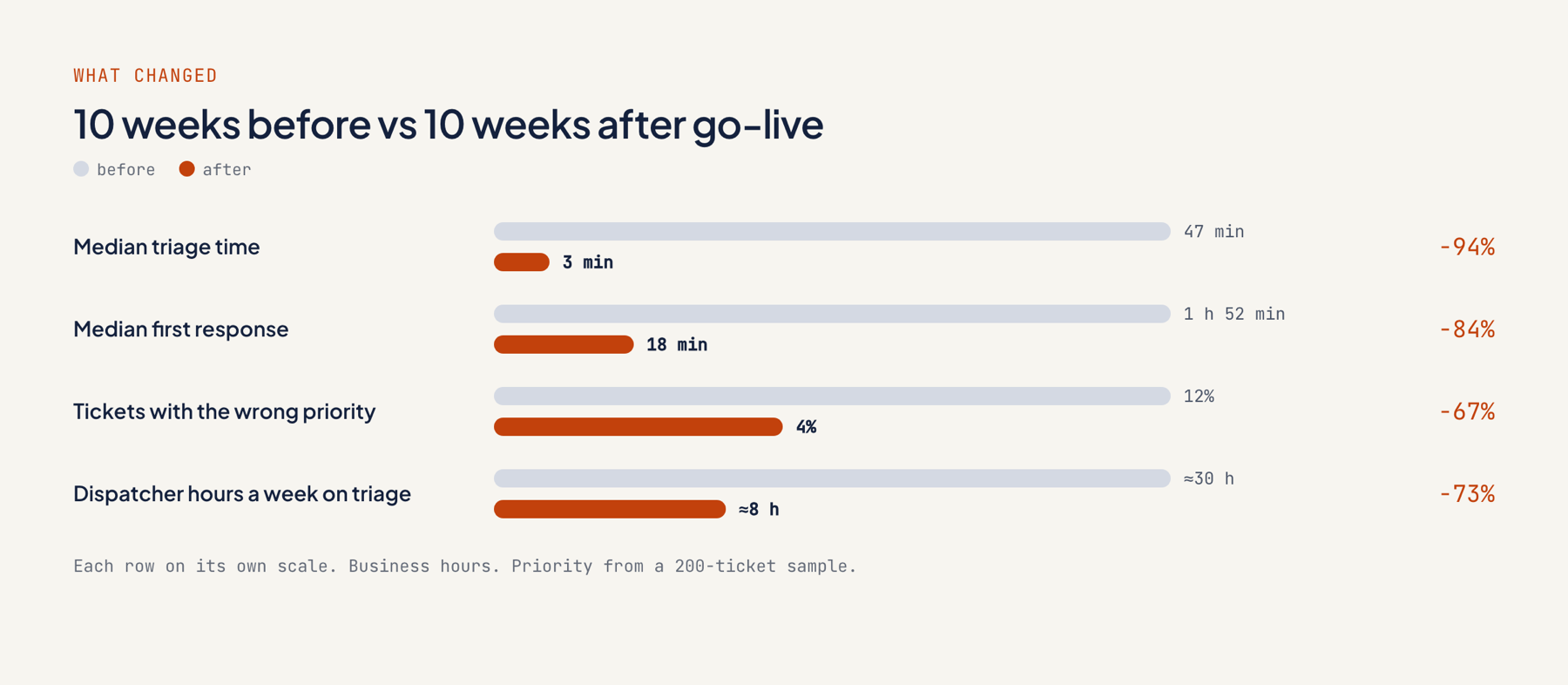
Median triage time fell from 47 minutes to 3 minutes, comparing the 10 weeks after go-live with the 10 weeks before. Median first response dropped from 1 h 52 min to 18 min.
| Metric | 10 weeks before | 10 weeks after |
|---|---|---|
| Median triage time (business hours) | 47 min | 3 min |
| Median first response (business hours) | 1 h 52 min | 18 min |
| Wrong priority (200-ticket sample) | 12% | 4% |
| Agent category kept by technicians | Not applicable | 91% |
| Drafts sent with no or light edits | Not applicable | 64% |
| Dispatcher hours a week on triage | About 30 | About 8 |
The MSP pulled these numbers itself from HaloPSA reports and the MCP server's tool-call log, so all figures are first-party.
What did the project cost, and how long did it take?
The audit cost $1,500 and the agent build came to $16,000, MCP server included; the MSP went live 5 weeks after the audit kicked off.
| Stage | Time | Price |
|---|---|---|
| Audit and fixed quote | Week 1 | $1,500 |
| MCP server and agent build | Weeks 2 to 4 | $16,000 |
| Shadow run beside the dispatchers, then go-live | Week 5 | Included |
| Monthly plan | From week 6 | $2,500/month |
Claude usage and Azure hosting run through the MSP's own accounts, which get billed directly. See pricing.
What can other service teams take from this?
The big lesson: guardrails belong in code. The agent is safe on live tickets because its limits live in the MCP server's tools, which Claude cannot change.
- Build permissions into the tools. A draft-only reply tool beats any instruction in a prompt.
- Shadow the queue for a week. Comparing how the agent and the dispatcher triaged identical tickets set the confidence threshold.
- Hold escalation rules constant. Outage, security and VIP tickets run on set rules; AI judgment has no role.
- Record each override. The weekly review converts corrections into sharper instructions.
If you're planning a support agent for your team, book a scoping call.
FAQ
Can the agent send replies to clients?
No. Saving drafts is the only thing the MCP server allows, and a technician sends each reply from HaloPSA.
Why use a custom MCP server instead of calling the HaloPSA API directly?
A custom MCP server gives Claude seven named tools, each with fixed permissions, and logs every call. It can also serve other AI clients later, including Claude Desktop for technicians.
What is AI triage?
AI triage means an AI model reads each new support ticket, works out what kind of problem it is, sets the priority and hands it to the right person. Claude gets that done in a median of 3 minutes at this MSP, and the reply still goes out from a technician.
What does the agent do with outages?
It skips the draft and pages the on-call technician right away. That applies when a ticket matches the outage or security rules, or comes from a client's named VIPs.
What is a triage ticket?
A triage ticket is a new ticket that nobody has categorized, prioritized or assigned yet. Each ticket at this MSP begins in that state and keeps it until the agent sets its fields.