Key takeaways
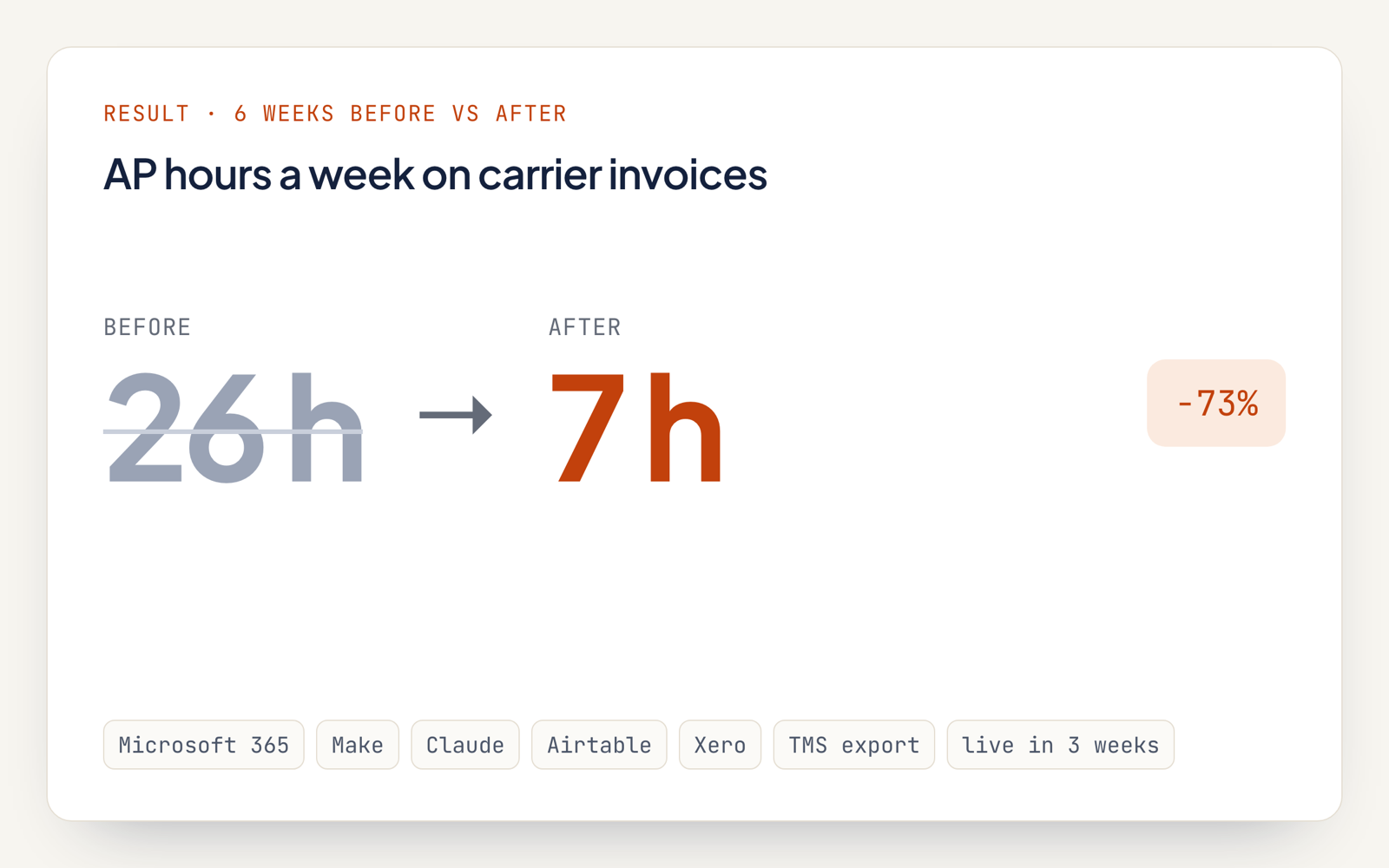
- The AP team went from about 26 hours a week on carrier invoices to about 7, measured across the 6 weeks before and after go-live.
- The workflow turns 78% of carrier invoices into Xero draft bills with no human edit and routes the remaining 22% to a review queue.
- In an audit of 500 posted bills, the share with a field error dropped from 2.1% to 0.4%.
- A human still approves every payment in Xero.
What problem did the forwarder's accounts payable team have?
The forwarder's three-person AP team lost about 26 hours a week to manual work, keying carrier invoices into Xero and reconciling them against shipment files by hand.
- Volume: One shared mailbox took in about 1,700 carrier invoices and 900 bills of lading a month, mostly as PDFs.
- Formats: More than 60 carriers, each billing in its own layout.
- Lag: Entering a bill took a median of 3.5 working days after the invoice arrived.
- Errors: A manual sample found 2.1% of entered bills with a wrong amount, currency or shipment reference.
How was carrier invoice processing automated?
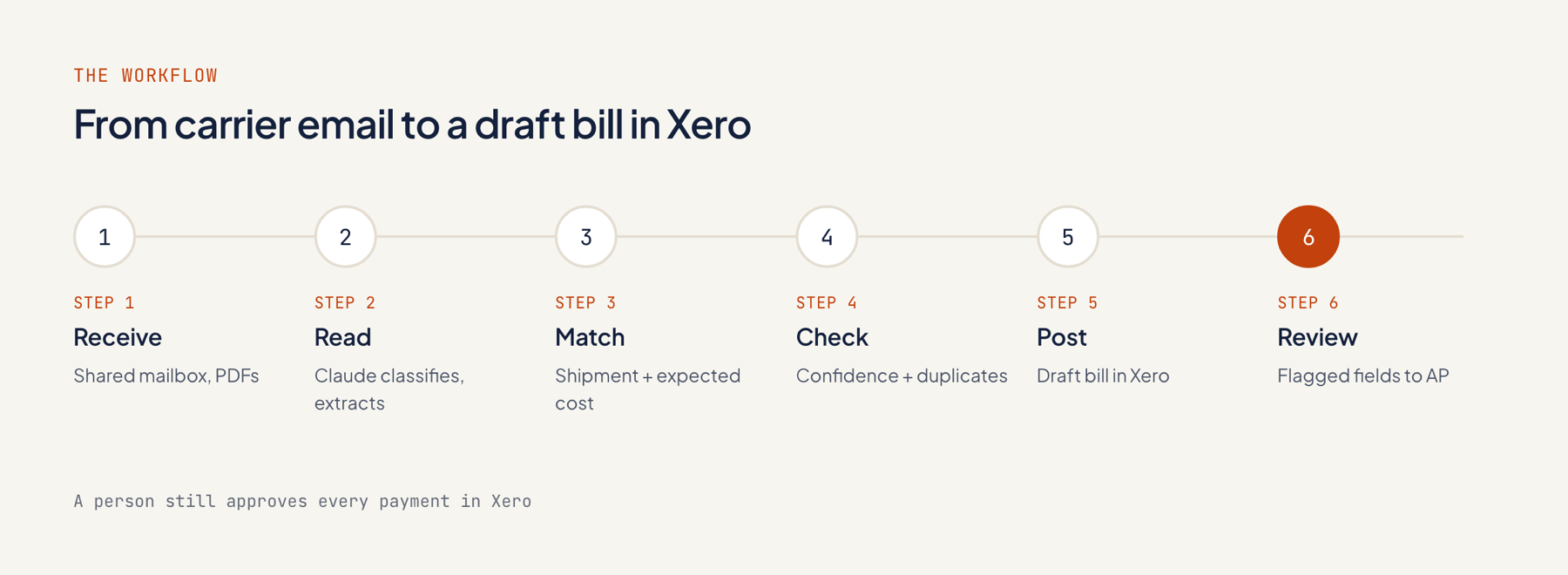
Applied Agents automated carrier invoice processing with a Make scenario that reads each incoming document, pulls out the fields, ties them to a shipment and drafts a bill in Xero, with anything uncertain sent to a review queue.
- Capture: Make monitors the shared AP mailbox in Microsoft 365 and picks up each new attachment.
- Sort: Claude tags every file as a carrier invoice, a bill of lading or something else.
- Read: it captures the carrier, invoice number, date, currency, charge lines, totals, bill of lading number and container numbers, with a confidence score attached to every field.
- Validate: a set of rules confirms that the charge lines add up to the total, the currency is valid and the invoice number has not appeared before.
- Link: the bill of lading or container number is connected to an open shipment in the forwarder's TMS, and the charges are compared against the expected cost as a basic freight audit.
- Flag: any low-confidence field, failed validation or cost gap over 2% sends the invoice to the review queue.
- Book: invoices that pass become draft bills in Xero, carrying the shipment reference and the original PDF.
The other document types we handle are listed on our AI document processing page.
Which tools does the workflow use?
Everything the workflow does happens inside the forwarder's own Microsoft 365, Make, Anthropic, Airtable and Xero accounts, with a daily shipment export from its TMS.
| Layer | Tool | Job |
|---|---|---|
| Intake | Microsoft 365 shared mailbox | Receives carrier documents |
| Workflow | Make | Runs every step and logs each run |
| AI | Claude, through the Anthropic API | Classifies documents and extracts fields |
| Review queue | Airtable interface | Shows flagged fields to AP clerks |
| Shipments | TMS export | Open shipments and expected costs |
| Accounting | Xero | Draft bills with PDF attached |
What stayed with people?
The judgment work stays with people: clearing the review queue, approving every bill for payment and handling every carrier dispute.
- In Airtable, AP clerks confirm flagged fields or correct them; each correction is logged.
- The finance manager signs off on draft bills for payment in Xero, as before.
- Any cost gap over 2% lands with the shipment's operations owner to dispute or accept.
- Any new carrier layout means a person checks its first 10 invoices.
What changed, and how was it measured?
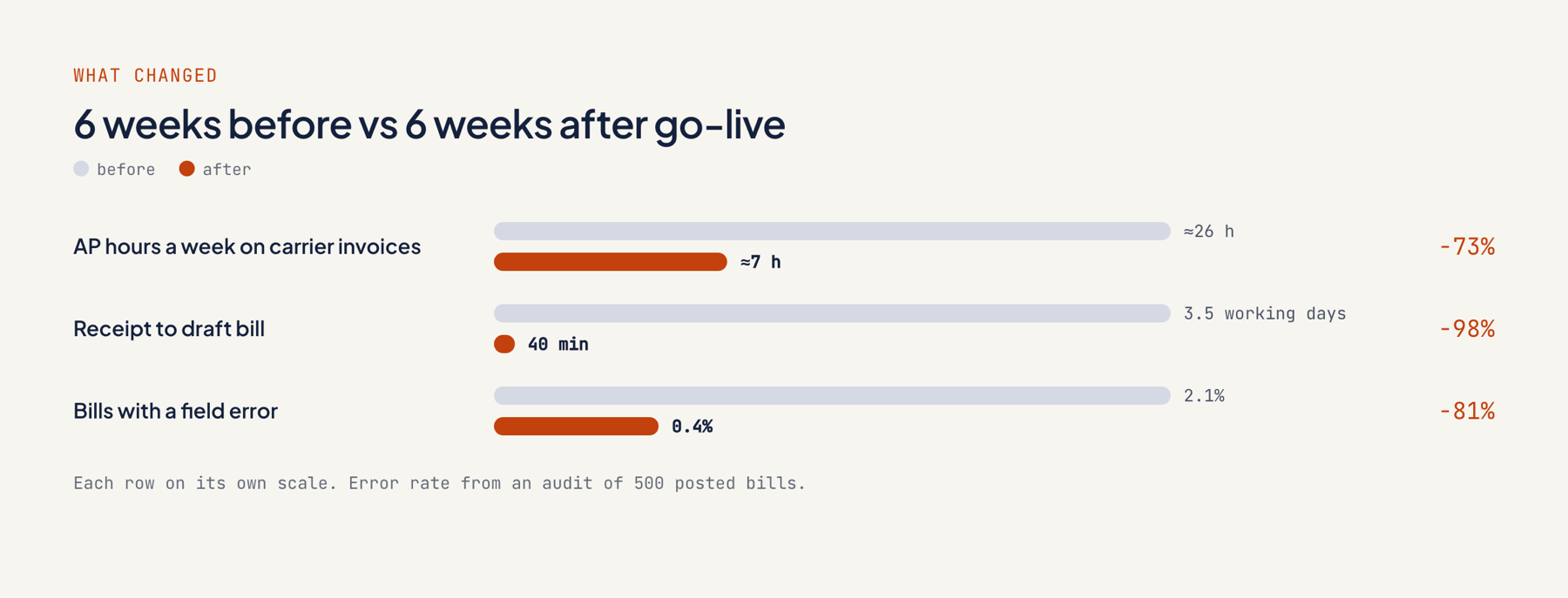
AP time on carrier invoices fell from about 26 hours a week to about 7, measured by comparing the 6 weeks before go-live with the 6 weeks after.
| Metric | 6 weeks before | 6 weeks after |
|---|---|---|
| AP hours a week on carrier invoices (timesheets) | About 26 | About 7 |
| Median time from receipt to draft bill | 3.5 working days | 40 minutes |
| Invoices posted with no human edit | None | 78% |
| Invoices sent to the review queue | Not applicable | 22% |
| Bills with a field error (audit of 500 bills) | 2.1% | 0.4% |
| Duplicate invoices caught before payment | Not tracked | 11 |
These are the forwarder's first-party numbers, taken from its timesheets, the Make run logs and a manual audit.
What did the project cost, and how long did it take?
The audit cost $1,500 and the build $7,500, both at a fixed price. The forwarder kept the $2,500-a-month plan, which covers monitoring and new carrier layouts.
| Stage | Time | Price |
|---|---|---|
| Audit and fixed quote | Week 1 | $1,500 |
| Build and testing on real invoices | Weeks 2 and 3 | $7,500 |
| Hand-over with documentation | End of week 3 | Included |
| Monthly plan | From week 4 | $2,500/month, cancel any month |
Make operations, Claude usage and Airtable seats go on the forwarder's own accounts. Our pricing section lists the full plans.
What can other operations teams take from this?
Copy the core pattern: check invoice fields against shipment data and rules before anything posts to Xero.
- Grade fields instead of whole documents. One murky total routes that invoice to review; the remainder of the batch goes through.
- Check charges against your own records. Comparing billed charges to the expected shipment cost exposes overbilling that extraction alone overlooks.
- Stand up the review queue first. Clerks bought in because each flagged field could be seen and corrected.
- Keep an eye on new layouts. A person manually checks the first 10 invoices from a new carrier.
If you want your own document flow mapped, book a scoping call.
FAQ
How many carrier invoice layouts can the workflow read?
The workflow handled over 60 carrier layouts at go-live, and none of them needed a dedicated template. A team member manually checks the first 10 invoices from any new format.
Does the AI approve payments?
No. It drafts bills in Xero, and the forwarder's finance manager signs off on every payment.
What happens when a field is unclear?
The invoice moves to an Airtable review queue with the unclear field flagged for attention. An AP clerk confirms or corrects the value before any bill gets created.
Is this a three-way match for freight invoices?
Yes, it is the freight equivalent of one. Every carrier invoice is matched against the bill of lading and the shipment record with its expected cost, and any gap above 2% is routed to a person.
Can AI be used for invoice processing?
Yes. In this setup, Claude classifies each document and pulls out the fields, while fixed rules verify totals, duplicates and shipment matches before anything reaches Xero.