
Key takeaways
- AI document processing goes by another name: intelligent document processing (IDP). It takes in PDFs, scans and email attachments, pulls out the fields you need and sends them to your business systems.
- Applied Agents pricing starts at $5,000 for a document workflow and $12,000 for a document agent handling varied or judgment-heavy files, both at a fixed price.
- Before anything reaches your accounting system or CRM, a person checks every field the model is unsure about.
What is AI document processing?
AI document processing is software that takes in your files, identifies what each one is, pulls out the data you need and passes it into your business systems, with a human reviewing anything the model is unsure of.
The same thing goes by intelligent document processing (IDP). IBM and other vendors describe it as four stages:
- Capture: documents come in through an inbox, a shared folder or an upload form.
- Classify: the model tags each file as an invoice, a contract or an order form.
- Extract: OCR paired with a large language model reads the text, tables and layout to pull out fields.
- Validate and route: extracted values get checked against your records, then written into the right system.
Basic OCR only turns an image into text. Everything after that is what gets rid of the retyping.

Which documents can AI process for a B2B team?
Start with the documents someone on your team retypes every week: usually invoices, contracts and order forms.
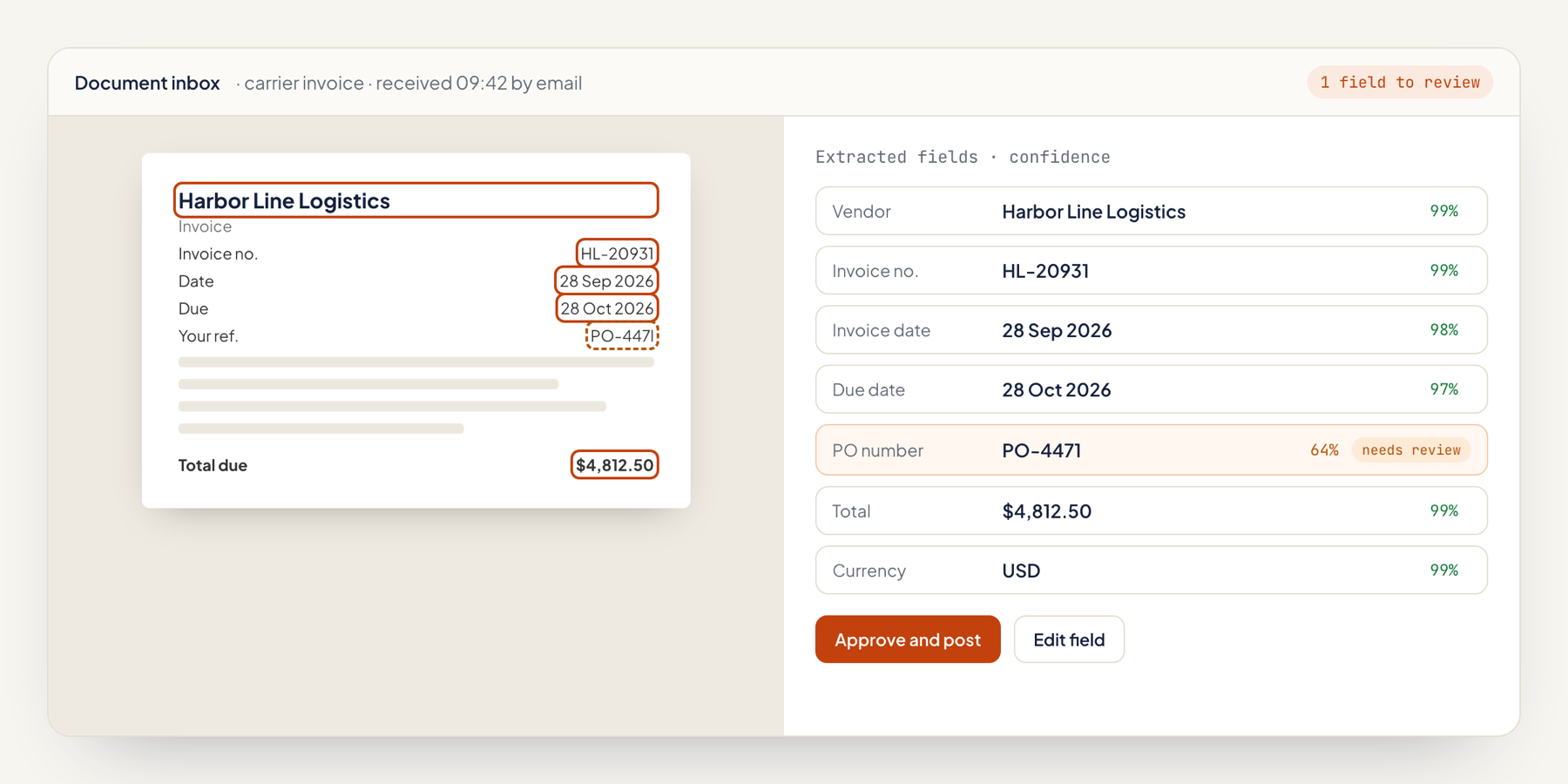
- Supplier invoices: we capture vendor, amount, due date and line items, match them to the purchase order and route everything to your accounting system for approval.
- Customer contracts: start date, renewal date, notice period and contract value go straight onto the CRM deal.
- Order forms and purchase orders: the customer, SKUs and quantities end up as an order record.
- Onboarding and compliance forms: our checks catch missing fields in tax forms and vendor questionnaires.
- Delivery documents: every proof of delivery and shipping manifest gets logged against its order.
For sales-side workflows such as lead routing, head to our AI sales automation page.
Who needs AI document processing?
B2B companies with 10 to 200 people get the most value, especially where finance, ops or sales ops staff move data out of PDFs by hand.
- Finance teams keying supplier invoices into the accounting system one at a time.
- Ops teams converting emailed order forms into orders.
- Sales ops teams watching renewal dates in signed contracts.
- Teams that tested ChatGPT on their files and need the output written into a system every time.
If you process millions of pages a month under strict archiving rules, enterprise IDP suites like ABBYY or UiPath are the better fit.
How much does AI document processing cost?
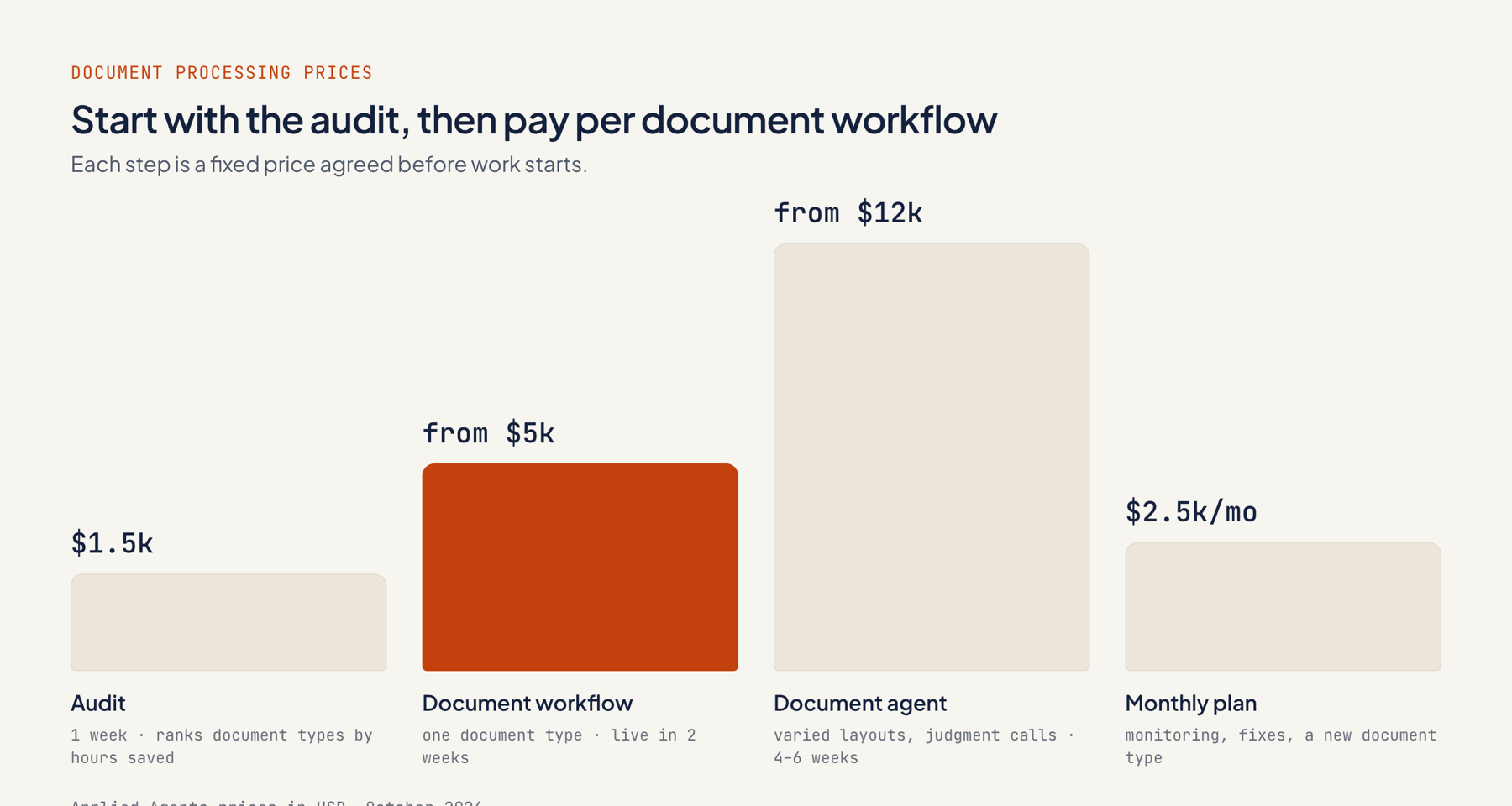
A document workflow built with Applied Agents starts at $5,000 fixed, while a standalone document agent starts at $12,000; most agency automation projects run $2,000–$10,000.
| Option | Applied Agents price | When to choose it |
|---|---|---|
| Automation audit | $1,500, 1 week | You have several document types and want them ranked by hours saved |
| Document workflow | From $5,000, live in 2 weeks | One document type with known fields, such as invoices |
| Document agent | From $12,000, live in 4–6 weeks | Varied layouts or a judgment call, such as flagging non-standard contract clauses |
| Monthly plan | $2,500/month | Monitoring, fixes and a new document type each month |
For comparison, ongoing agency retainers usually cost $1,500–$8,000 a month. OCR and AI model fees are charged to your own accounts. See all prices.
How does an AI document processing build work?
A build starts on your real documents: we assemble and test the workflow on a sample before anything connects to your live systems.
- Discovery call (day 1): 30 minutes on the documents you receive, their volume, and where the data lands.
- File audit (week 1): we go through sample files, catalog the fields, rank document types by hours saved and quote a fixed price.
- Build (weeks 2–3): capture from your inbox or folder, AI model extraction, a confidence check, a review queue and writing the results to your system.
- Testing: we match the extracted values against your team's manual entries on the same documents.
- Handover: documentation, a walkthrough that trains your reviewers, and an optional monthly plan.
Every Applied Agents build follows these steps, as described under how it works.
What's included in a document processing build?
Each build takes one document type from inbox to system of record and includes a human review step.
- Intake via email, a shared drive or an upload form.
- Claude or OpenAI models handle field extraction, with OCR where scans need it.
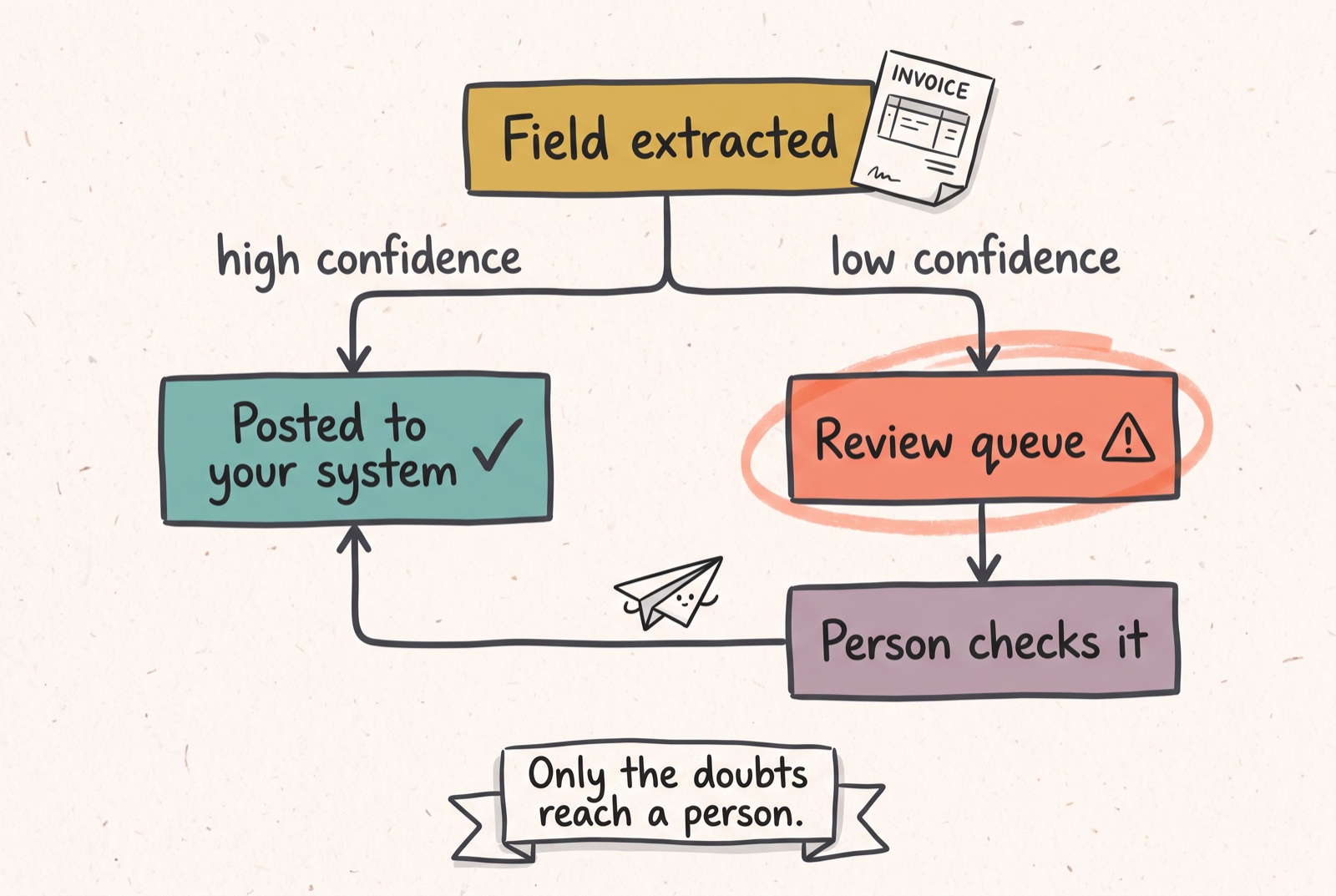
- A confidence threshold that routes low scores to a person for review.
- Validation against your own data, like matching an invoice to a purchase order.
- The workflow is handed over in your own n8n, Make or Zapier account, with documentation.
Which AI document processing tool should you use?
The right document processing tool depends on scan quality, document variety, volume and where the data has to go. We test candidates on your files during the audit.
| Tool | Fits | Consider |
|---|---|---|
| LLM extraction (Claude or OpenAI) in n8n, Make or Zapier | Small teams with varied layouts and modest volume | Needs a confidence check and review step |
| Azure AI Document Intelligence | Microsoft environments; prebuilt invoice and form models | Azure account and setup |
| Amazon Textract | AWS-based apps; forms, tables and handwriting | Developer work to connect |
| Google Document AI | Classification and extraction pipelines on Google Cloud | Google Cloud project required |
| ABBYY or UiPath | High-volume enterprise IDP; ABBYY covers 200+ languages | Enterprise pricing and rollout |
| Nanonets or Rossum | Invoice and AP automation | Another subscription per document type |
How does Applied Agents compare with other ways to automate documents?
Applied Agents runs a fixed-price document workflow for teams of 10–200 inside accounts you own, and each alternative gives up ground on price, control or effort.
| Applied Agents | Freelancer | Enterprise firm | DIY tool | |
|---|---|---|---|---|
| Fits | One to a few document types for a 10–200 person team | A single parser on a tight budget | Company-wide IDP programs (Accenture, IBM, Deloitte) | Teams with a technical person and time |
| Price | From $5,000 fixed; agents from $12,000 | $100–$300/hour | $150,000–$400,000 for large builds | Per-page or per-seat fees plus staff time |
| Human review | Built in, with a confidence threshold | Varies | Included in large programs | You design it |
| Data location | Your accounts | Varies | Contract terms | The vendor's platform |
If one step has to reason across several systems, the project turns into an AI agent build.
How accurate is AI document processing, and where does a person step in?
Accuracy depends on scan quality and layout variety, and a person reviews any field the system can't read with confidence.
- Confidence scoring: each extracted value carries a score; anything under the cutoff lands in a review queue.
- Record checks: totals, dates and vendor names get compared against your records before writing.
- Measured baseline: we score extraction against your team's manual entries on the same files.
- Known limits: handwriting and poor scans pull accuracy down, and we don't train custom machine-learning models.
Agents reading from internal document stores connect through a custom MCP server with defined permissions.
Which projects show this in action?
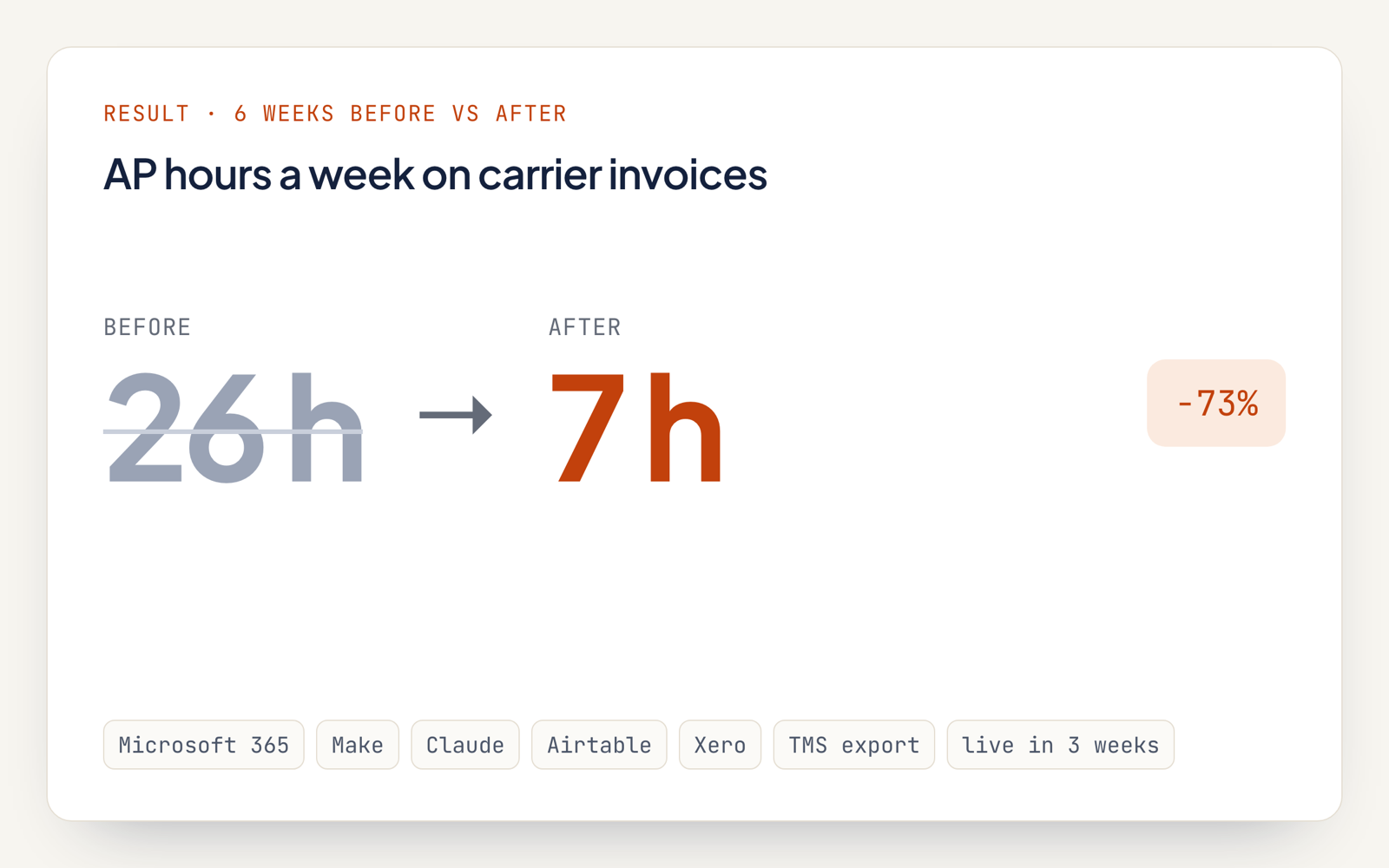
Each case study shows the workflow, the tools and the before-and-after numbers.
FAQ
Can I use ChatGPT to review a document?
Yes, one file at a time: ChatGPT summarizes an upload or answers questions about it. A processing workflow does that for every document that comes in and drops the fields into your systems.
Does it work with scanned PDFs and photos?
Yes. Scans and photos get an OCR pass first, and pages too poor to read go to a reviewer.
Can it read contracts as well as invoices?
Yes. A workflow build covers contracts with standard fields; pulling out clauses and flagging deviations takes a document agent, from $12,000.
Where are our documents stored?
In your email, drive and systems. Processing runs in your automation account and passes text to whichever AI provider you pick.
Do we need to change our accounting system or CRM?
No. The workflow writes into your existing systems through their APIs.
How many documents a month does this make sense for?
The audit settles that by ranking document types by hours saved. If a type takes your team only minutes a week, we say leave it manual.